Learning the OAA Runner Framework: Part 6 — Multiple Systems, Multiple Destinations
This is Part 6 of the Learning the OAA Runner Framework series. It builds on Part 5 — Connecting to a REST API.
What you’ll learn: Load data from three separate BongaWonga APIs into three Veza destination types — Custom App, HRIS, and IdP — using a separate config file for each. You’ll wire user-to-role relationships using a hook, map the Employee entity for HRIS, and learn the field naming differences between destination types.
Prerequisites
Completed or read Part 5 — Connecting to a REST API.
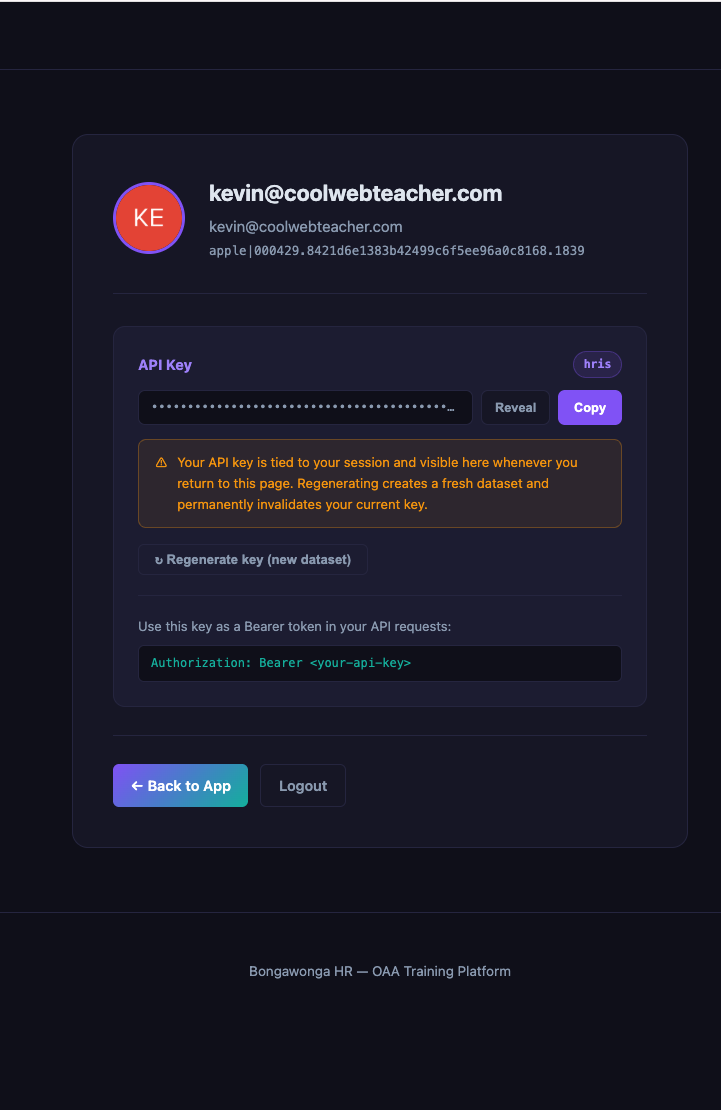
API credentials for the BongaWonga App, HRIS, and IdP APIs. Get them from each system’s profile page — see Getting API credentials.
Setup
Create your working directory:
mkdir -p 06-multi-source-api/modules
cd 06-multi-source-api
Set your environment variables for all three APIs:
export BW_APP_API_KEY=your_app_api_key
export BW_HRIS_API_KEY=your_hris_api_key
export BW_IDP_API_KEY=your_idp_api_key
Get each API key from the corresponding system’s profile page:
Copy the following code into a new file at modules/app_bw.py (if you already created this in Part 5, you can copy it from there instead):
import logging
import time

from oaa.modules.base_url_session import BaseURLSession
from oaa.modules.lazy_dicts import lazy_dict_table
from oaa.modules.params_or_env import params_or_env

logger = logging.getLogger(__name__)


class BongaWongaAPI:
    def __init__(self, connection, source):
        self.connection = connection
        self.source = source
        self.base_url = params_or_env(connection, source, 'base_url')
        self.api_key = params_or_env(connection, source, 'BW_APP_API_KEY')
        self._session = None

    @property
    def session(self):
        if not self._session:
            self._session = BaseURLSession(base_url=self.base_url)
            self._session.headers.update({
                'Authorization': f'Bearer {self.api_key}',
            })
        return self._session

    def fetch_paginated(self, path, resource_key='data', per_page=100):
        page = 1
        while True:
            params = {'page': page, 'per_page': per_page}
            logger.debug('Fetching %s page=%d', path, page)
            response = self.session.get(path, params=params, timeout=30)

            if response.status_code == 429:
                logger.warning('Rate limited, retrying in 5s')
                time.sleep(5)
                continue

            response.raise_for_status()
            data = response.json()
            records = data.get(resource_key, [])
            if not records:
                break
            yield from records
            pagination = data.get('pagination', {})
            if not pagination.get('has_next', False):
                break
            page += 1


def fetch(connection=None, source=None, **kwargs):
    api = BongaWongaAPI(connection, source)
    resource_path = source.params.get('resource', '')
    resource_key = source.params.get('resource_key', 'data')
    logger.debug('Fetching from resource: %s', resource_path)
    records = api.fetch_paginated(resource_path, resource_key=resource_key)
    return lazy_dict_table(records)
Copy the following code into a new file at modules/hris_bw.py:
import logging
import time

from oaa.modules.base_url_session import BaseURLSession
from oaa.modules.lazy_dicts import lazy_dict_table
from oaa.modules.params_or_env import params_or_env

logger = logging.getLogger(__name__)


class HrisAPI:
    def __init__(self, connection, source):
        self.connection = connection
        self.source = source
        self.base_url = params_or_env(connection, source, 'base_url')
        self.api_key = params_or_env(connection, source, 'BW_HRIS_API_KEY')
        self._session = None

    @property
    def session(self):
        if not self._session:
            self._session = BaseURLSession(base_url=self.base_url)
            self._session.headers.update({
                'Authorization': f'Bearer {self.api_key}',
            })
        return self._session

    def fetch_paginated(self, path, resource_key='data', per_page=100):
        page = 1
        while True:
            params = {'page': page, 'per_page': per_page}
            logger.debug('Fetching %s page=%d', path, page)
            response = self.session.get(path, params=params, timeout=30)

            if response.status_code == 429:
                logger.warning('Rate limited, retrying in 5s')
                time.sleep(5)
                continue

            response.raise_for_status()
            data = response.json()
            records = data.get(resource_key, [])
            if not records:
                break
            yield from records
            pagination = data.get('pagination', {})
            if not pagination.get('has_next', False):
                break
            page += 1


def fetch(connection=None, source=None, **kwargs):
    api = HrisAPI(connection, source)
    resource_path = source.params.get('resource', '')
    resource_key = source.params.get('resource_key', 'data')
    logger.debug('Fetching from HRIS resource: %s', resource_path)
    records = api.fetch_paginated(resource_path, resource_key=resource_key)
    return lazy_dict_table(records)
Copy the following code into a new file at modules/idp_bw.py:
import logging
import time

from oaa.modules.base_url_session import BaseURLSession
from oaa.modules.lazy_dicts import lazy_dict_table
from oaa.modules.params_or_env import params_or_env

logger = logging.getLogger(__name__)


class IdpAPI:
    def __init__(self, connection, source):
        self.connection = connection
        self.source = source
        self.base_url = params_or_env(connection, source, 'base_url')
        self.api_key = params_or_env(connection, source, 'BW_IDP_API_KEY')
        self._session = None

    @property
    def session(self):
        if not self._session:
            self._session = BaseURLSession(base_url=self.base_url)
            self._session.headers.update({
                'Authorization': f'Bearer {self.api_key}',
            })
        return self._session

    def fetch_paginated(self, path, resource_key='data', per_page=100):
        page = 1
        while True:
            params = {'page': page, 'per_page': per_page}
            logger.debug('Fetching %s page=%d', path, page)
            response = self.session.get(path, params=params, timeout=30)

            if response.status_code == 429:
                logger.warning('Rate limited, retrying in 5s')
                time.sleep(5)
                continue

            response.raise_for_status()
            data = response.json()
            records = data.get(resource_key, [])
            if not records:
                break
            yield from records
            pagination = data.get('pagination', {})
            if not pagination.get('has_next', False):
                break
            page += 1


def fetch(connection=None, source=None, **kwargs):
    api = IdpAPI(connection, source)
    resource_path = source.params.get('resource', '')
    resource_key = source.params.get('resource_key', 'data')
    logger.debug('Fetching from IdP resource: %s', resource_path)
    records = api.fetch_paginated(resource_path, resource_key=resource_key)
    return lazy_dict_table(records)
Copy the following code into a new file at modules/bw_hooks.py:
import logging

from oaa.hooks.decorators import record_transform_non_stream

logger = logging.getLogger(__name__)


@record_transform_non_stream(target='app_roles')
def link_role_users(record, provider=None, **kwargs):
    user_ids = getattr(record, 'assigned_user_ids', [])
    group_ids = getattr(record, 'assigned_group_ids', [])
    for uid in user_ids:
        user = provider.local_users.get(uid)
        if user:
            user.add_role(record.unique_id, apply_to_application=True)
    for gid in group_ids:
        group = provider.local_groups.get(gid)
        if group:
            group.add_role(record.unique_id, apply_to_application=True)


@record_transform_non_stream(target='idp_users')
def link_idp_user_groups(record, provider=None, **kwargs):
    group_ids = getattr(record, 'group_ids', [])
    for gid in group_ids:
        group = provider.groups.get(gid)
        if group:
            group.add_user(record.identity)
Create empty config files:
touch config-customapp.yaml config-hris.yaml config-idp.yaml

All three filenames use kebab-case consistently. Use the exact names shown — oaa-runner
reads the filename you pass to `--config-file`.
Three config files, one per destination type:
File |
Destination |
What it loads |
|---|---|---|
|
Custom App |
Users, groups, roles, projects, workflows |
|
HRIS |
Employees |
|
IdP |
Identity users and groups |
Part 1: Custom App config
Edit config-customapp.yaml. This builds on Part 5 and adds three things: a hook for
role assignments, project and workflow resources, and a permission map.
Step 1: Add the hook module
In the config header, add logic_modules alongside module_directory:
module_directory: ./modules
logic_modules:
  - bw_hooks
bw_hooks is the module at modules/bw_hooks.py. It contains the link_role_users hook.
Step 2: Add the hook to the roles source
In the app_roles source, add record_transforms_non_stream:
  app_roles:
    destination: LocalRole
    source_type: custom
    connection: bw_app
    params:
      resource: /roles
      resource_key: data
    field_mapping:
      unique_id:
        destination_field: unique_id
      name:
        destination_field: name
    record_transforms_non_stream:
      - link_role_users
modules/bw_hooks.py was created in Setup. The link_role_users hook:
@record_transform_non_stream(target='app_roles')
def link_role_users(record, provider=None, **kwargs):
    for uid in getattr(record, 'assigned_user_ids', []):
        user = provider.local_users.get(uid)
        if user:
            user.add_role(record.unique_id, apply_to_application=True)
    for gid in getattr(record, 'assigned_group_ids', []):
        group = provider.local_groups.get(gid)
        if group:
            group.add_role(record.unique_id, apply_to_application=True)
The BongaWonga App API includes assigned_user_ids and assigned_group_ids on each role
record. After all records load, this hook iterates those lists and calls add_role() on
each user and group. This is a cross-record relationship that can’t be expressed as a
field mapping.
The provider object passed to hooks is the in-memory graph of all loaded OAA objects.
provider.local_users, provider.local_groups, provider.resources, provider.employees,
and other attributes are dicts keyed by unique_id. For a full attribute reference, see
What is the OAA provider object?.
Step 3: Add projects and workflows as resources
The BongaWonga App API has two resource types: Projects and Workflows. Add them as separate
sources after app_roles:
  app_projects:
    destination: Resource
    resource_type: Project
    source_type: custom
    connection: bw_app
    params:
      resource: /projects
      resource_key: data
    field_mapping:
      unique_id:
        destination_field: unique_id
      name:
        destination_field: name
      status:
        destination_field: status
        custom_type: STRING
      priority:
        destination_field: priority
        custom_type: STRING
      department:
        destination_field: department
        custom_type: STRING
      is_confidential:
        destination_field: is_confidential
        custom_type: BOOLEAN

  app_workflows:
    destination: Resource
    resource_type: Workflow
    source_type: custom
    connection: bw_app
    params:
      resource: /workflows
      resource_key: data
    field_mapping:
      unique_id:
        destination_field: unique_id
      name:
        destination_field: name
      status:
        destination_field: status
        custom_type: STRING
      category:
        destination_field: category
        custom_type: STRING
      environment:
        destination_field: environment
        custom_type: STRING
      is_automated:
        destination_field: is_automated
        custom_type: BOOLEAN
destination: Resource is the OAA entity type for application resources. resource_type
sets the resource type label shown in Veza — use distinct values (Project, Workflow) so
Veza can differentiate them.
Step 4: Add the permission map
The BongaWonga App API defines its own permission names. Add a permission_to_veza_map
block at the top level of the config to translate them to Veza’s authorization model:
permission_to_veza_map:
  read:
    permissions:
      - DataRead
  write:
    permissions:
      - DataWrite
  delete:
    permissions:
      - DataDelete
  create:
    permissions:
      - DataCreate
  update:
    permissions:
      - DataWrite
  list:
    permissions:
      - MetadataRead
  admin:
    permissions:
      - DataRead
      - DataWrite
      - DataDelete
      - DataCreate
      - NonData
Each key is an app permission name from the API. permissions lists the Veza permission
types it maps to. admin maps to all four data permissions plus NonData.
Try it: Run the Custom App config
uv tool run --from oaa-runner oaa app run \
  --config-file=config-customapp.yaml --no-push
You should see users, groups, roles, projects, and workflows load. The hook should run and log role assignments.
Part 2: HRIS config
Edit config-hris.yaml. The HRIS destination type uses different OAA entities and requires
a destination_type key.
Step 1: Set destination_type
At the top of the config, below log_level, add:
destination_type: HRIS
Without this, oaa-runner defaults to Custom App and ignores HRIS-specific config.
destination_type routes the run to the HRIS provider, which expects Employee records.
Step 2: Configure the app block for HRIS
app:
  name: BongaWonga HRIS
  hris_type: bongawonga
  url: https://hris.bongawonga.com
HRIS uses hris_type (not application_type) and adds a url field. The url is the
base URL of the HRIS system as it will appear in Veza.
Step 3: Add the HRIS connection
connections:
  bw_hris:
    connection_type: custom
    custom_module: hris_bw
    required_env:
      - BW_HRIS_API_KEY
    params:
      base_url: https://hris.bongawonga.com/api/v1
Same structure as the bw_app connection but pointing at the HRIS API and using the
hris_bw module (which handles pagination identically to app_bw).
Step 4: Add the employees source
The HRIS destination uses Employee instead of LocalUser. Add the employees source:
sources:
  employees:
    destination: Employee
    source_type: custom
    connection: bw_hris
    params:
      resource: /employees
      resource_key: data
    field_mapping:
      unique_id:
        destination_field: unique_id
      employee_number:
        destination_field: employee_number
      full_name:
        destination_field: name
        transforms:
          - name: jinja_render
            options:
              template: "{{ row.first_name }} {{ row.last_name }}"
      first_name:
        destination_field: first_name
      last_name:
        destination_field: last_name
      email:
        destination_field: email
        transforms:
          - name: jinja_render
            options:
              template: "{{ row.email or '' }}"
          - name: lowercase
      employment_status:
        destination_field: employment_status
      is_active_status:
        destination_field: is_active
        transforms:
          - name: jinja_render
            options:
              template: "{{ 'true' if row.employment_status == 'active' else 'false' }}"
          - name: validate_boolean
      hire_date:
        destination_field: hire_date
        transforms:
          - name: date_convert
HRIS-specific fields:
employee_number— required for Employee records. Maps to the HRISemployee_numberfield.employment_status— maps the API’s string field directly for display in Veza.is_active_status— a second mapping for the same source field. The YAML keyis_active_statusis a label (not an API field name).jinja_renderreadsrow.employment_statusand converts it to a boolean for the OAAis_activefield.
Why two entries for employment_status:
The HRIS Employee entity needs both the string value (employment_status → stores
"active", "inactive", etc.) and the boolean flag (is_active → true/false) for
different Veza features. YAML doesn’t allow duplicate keys, so the second mapping uses a
unique label (is_active_status) and relies on jinja_render to read from the correct
source column.
Why full_name uses jinja_render:
The HRIS API has separate first_name and last_name fields but no combined name field.
The jinja_render combines them. The key full_name is a label — it’s not an API field.
Try it: Run the HRIS config
uv tool run --from oaa-runner oaa app run \
  --config-file=config-hris.yaml --no-push
You should see employee records loading. The BongaWonga HRIS API has ~1% of employees
with null email by design. The jinja_render step before lowercase coerces those nulls
to an empty string so the run does not crash. Employees with no email will have an empty
email field in Veza.
Add the groups source
HRIS templates also support destination: Group for organizational units. HRIS groups use
unique_id (not identity) and a group_type:
  groups:
    destination: Group
    source_type: custom
    connection: bw_hris
    params:
      resource: /groups
      resource_key: data
    field_mapping:
      unique_id:
        destination_field: unique_id
      name:
        destination_field: name
      group_type:
        destination_field: group_type
When group_type is not mapped, it defaults to the GROUP_TYPE config value
(Department). Map it as a plain field (no custom_type) to set a per-group type such as
Team or Cost Center. To link employees to their groups, call
employee.add_group(group_id) in a hook.
Part 3: IdP config
Edit config-idp.yaml. The IdP destination uses yet another set of entity names and
identifiers.
Step 1: Set destination_type
destination_type: IDP
Step 2: Configure the app block for IdP
app:
  name: BongaWonga Identity
  idp_type: bongawonga
  domain: idp.bongawonga.com
IdP uses idp_type and domain (bare hostname, no protocol prefix).
Step 3: Add the IdP connection and hook module
module_directory: ./modules
logic_modules:
  - bw_hooks

connections:
  bw_idp:
    connection_type: custom
    custom_module: idp_bw
    required_env:
      - BW_IDP_API_KEY
    params:
      base_url: https://idp.bongawonga.com/api/v1
Step 4: Add the IdP users source
The IdP destination uses User (not LocalUser) and maps the user identifier to
identity (not unique_id):
sources:
  idp_users:
    destination: User
    source_type: custom
    connection: bw_idp
    params:
      resource: /users
      resource_key: data
    field_mapping:
      unique_id:
        destination_field: identity
      name:
        destination_field: name
      email:
        destination_field: email
        transforms:
          - name: lowercase
      external_id:
        destination_field: external_id
        custom_type: STRING
      status:
        destination_field: is_active
        transforms:
          - name: jinja_render
            options:
              template: "{{ 'true' if row.status == 'active' else 'false' }}"
          - name: validate_boolean
      mfa_enabled:
        destination_field: mfa_enabled
        custom_type: BOOLEAN
      created_at:
        destination_field: created_at
        transforms:
          - name: date_convert
      last_login:
        destination_field: last_login_at
        transforms:
          - name: date_convert
    record_transforms_non_stream:
      - link_idp_user_groups
IdP destination type differences:
Concept |
Custom App |
IdP |
|---|---|---|
User entity |
|
|
User identifier |
|
|
App block field |
|
|
App block URL |
n/a |
|
Map the API’s user ID field (unique_id) to destination_field: identity. The IdP provider
requires identity as the primary user identifier — using unique_id here would cause
user-to-group lookups to fail.
The link_idp_user_groups hook in bw_hooks.py:
@record_transform_non_stream(target='idp_users')
def link_idp_user_groups(record, provider=None, **kwargs):
    group_ids = getattr(record, 'group_ids', [])
    for gid in group_ids:
        group = provider.groups.get(gid)
        if group:
            group.add_user(record.identity)
Each IdP user record from the API includes a group_ids list. After all records load,
the hook iterates those IDs and calls group.add_user() for each. Note it uses
record.identity (not record.unique_id) to match the IdP provider’s identifier.
Step 5: Add the IdP groups source
  idp_groups:
    destination: Group
    source_type: custom
    connection: bw_idp
    params:
      resource: /groups
      resource_key: data
    field_mapping:
      unique_id:
        destination_field: unique_id
      name:
        destination_field: name
      group_type:
        destination_field: group_type
      is_admin:
        destination_field: is_admin
        custom_type: BOOLEAN
IdP groups use Group (not LocalGroup). group_type is a standard field on the Group
entity — do not add custom_type: STRING here. Using custom_type registers the field
as a custom property rather than binding it to the built-in group_type field, which causes
oaa-runner to report required field group_type is not mapped even though it appears in
the config. Map it with only destination_field: group_type and no custom_type.
Try it: Run the IdP config
uv tool run --from oaa-runner oaa app run \
  --config-file=config-idp.yaml --no-push
You should see users and groups load, followed by the link_idp_user_groups hook running
and assigning users to groups.
Run all three configs
From the 06-multi-source-api directory, run each config in turn:
# Custom App
uv tool run --from oaa-runner oaa app run \
  --config-file=config-customapp.yaml --no-push

# HRIS
uv tool run --from oaa-runner oaa app run \
  --config-file=config-hris.yaml --no-push

# IdP
uv tool run --from oaa-runner oaa app run \
  --config-file=config-idp.yaml --no-push
If it worked, you’ll see for each run:
Users, groups, roles loaded from the API
User-to-group and user-to-role relationships wired
Final output:
status: true,report: []
Each run is independent — the three configs push to separate Veza providers and do not share state. Run them in any order. In production, schedule them separately or wrap them in a shell script that runs them in sequence with appropriate error handling.
Summary: destination type differences
Config field |
Custom App |
HRIS |
IdP |
|---|---|---|---|
|
(omit) |
|
|
|
|
|
|
|
(none) |
|
|
User entity |
|
|
|
User identifier |
|
|
|
Group entity |
|
n/a |
|
HRIS-only fields |
— |
|
— |
What’s next
Part 7 — Fetching CSV Data over HTTP: load CSV data delivered over HTTP using a custom fetch module.
Part 8 — Scoping Permissions to Resources: scope role assignments to specific Projects and Workflows instead of the whole application.