Learning the OAA Runner Framework: Part 8 — Scoping Permissions to Resources

This is Part 8 of the Learning the OAA Runner Framework series. It builds on Part 6 — Multiple Systems, Multiple Destinations.
What you’ll learn: Scope role assignments to specific resources (Projects and Workflows)
instead of assigning them application-wide. Example 06 used apply_to_application=True,
which grants access to the entire application. This example replaces that with
apply_to_application=False and a list of specific resource objects — so Veza can show
exactly which projects or workflows a user or group can access.
Prerequisites
Completed or read Part 6 — Multiple Systems, Multiple Destinations.
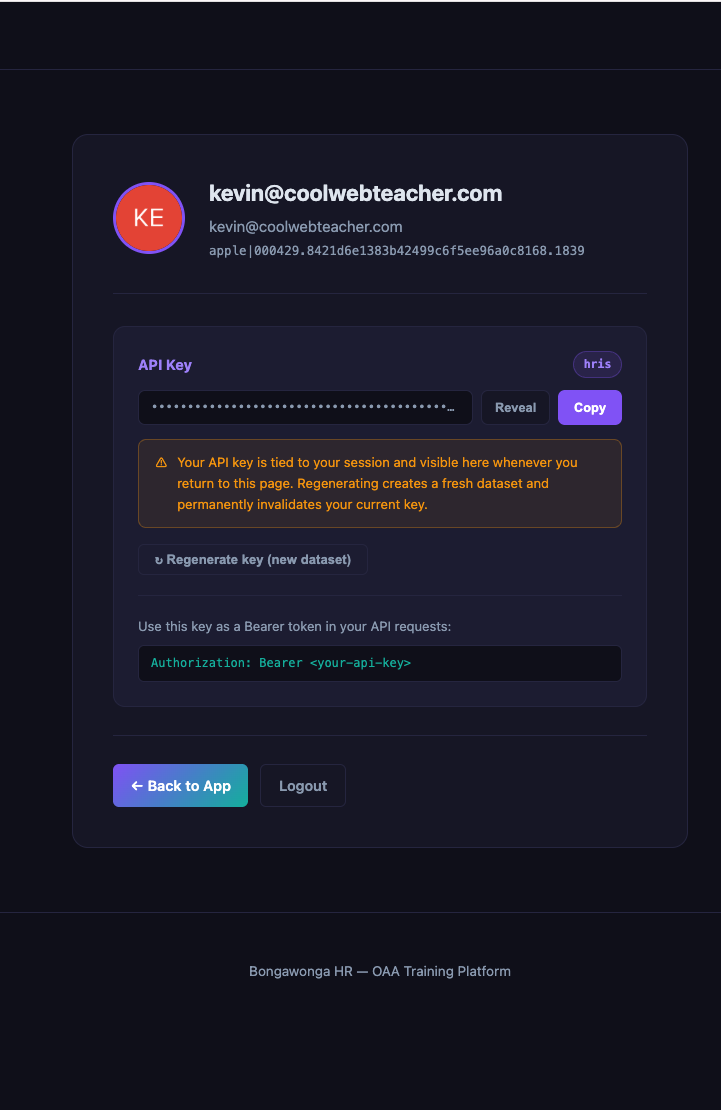
An API key for the BongaWonga App (
BW_APP_API_KEY). Get it from your profile page athttps://app.bongawonga.com/profile.
Setup
Create your working directory:
mkdir -p 08-resource-permissions/modules
cd 08-resource-permissions
Set your credentials:
export BW_APP_API_KEY=your_api_key
Copy the following code into a new file at modules/app_bw.py (if you already created this in Part 5, you can copy it from there instead):
import logging
import time

from oaa.modules.base_url_session import BaseURLSession
from oaa.modules.lazy_dicts import lazy_dict_table
from oaa.modules.params_or_env import params_or_env

logger = logging.getLogger(__name__)


class BongaWongaAPI:
    def __init__(self, connection, source):
        self.connection = connection
        self.source = source
        self.base_url = params_or_env(connection, source, 'base_url')
        self.api_key = params_or_env(connection, source, 'BW_APP_API_KEY')
        self._session = None

    @property
    def session(self):
        if not self._session:
            self._session = BaseURLSession(base_url=self.base_url)
            self._session.headers.update({
                'Authorization': f'Bearer {self.api_key}',
            })
        return self._session

    def fetch_paginated(self, path, resource_key='data', per_page=100):
        page = 1
        while True:
            params = {'page': page, 'per_page': per_page}
            logger.debug('Fetching %s page=%d', path, page)
            response = self.session.get(path, params=params, timeout=30)

            if response.status_code == 429:
                logger.warning('Rate limited, retrying in 5s')
                time.sleep(5)
                continue

            response.raise_for_status()
            data = response.json()
            records = data.get(resource_key, [])
            if not records:
                break
            yield from records
            pagination = data.get('pagination', {})
            if not pagination.get('has_next', False):
                break
            page += 1


def fetch(connection=None, source=None, **kwargs):
    api = BongaWongaAPI(connection, source)
    resource_path = source.params.get('resource', '')
    resource_key = source.params.get('resource_key', 'data')
    logger.debug('Fetching from resource: %s', resource_path)
    records = api.fetch_paginated(resource_path, resource_key=resource_key)
    return lazy_dict_table(records)
Copy the following code into a new file at modules/perm_hooks.py:
import logging

from oaa.hooks.decorators import record_transform_non_stream

logger = logging.getLogger(__name__)


@record_transform_non_stream(target='app_roles')
def assign_role_to_resources(record, provider=None, **kwargs):
    """Assign each role to the specific resources it covers.

    Role records include project_ids and workflow_ids. This hook scopes each
    user/group role assignment to those resources instead of the whole application.
    """
    role_id = record.unique_id

    for resource_ids in [
        getattr(record, 'project_ids', []),
        getattr(record, 'workflow_ids', []),
    ]:
        for rid in resource_ids:
            resource = provider.resources.get(rid)
            if not resource:
                logger.debug('Resource %s not found for role %s', rid, role_id)
                continue
            for uid in getattr(record, 'assigned_user_ids', []):
                user = provider.local_users.get(uid)
                if user:
                    user.add_role(role_id, resources=[resource], apply_to_application=False)
            for gid in getattr(record, 'assigned_group_ids', []):
                group = provider.local_groups.get(gid)
                if group:
                    group.add_role(role_id, resources=[resource], apply_to_application=False)
Create an empty config.yaml:
touch config.yaml
Step 1: What Part 6 leaves out
In Part 6, the link_role_users hook calls:
user.add_role(record.unique_id, apply_to_application=True)
apply_to_application=True is a blunt instrument — it says “this user has this role
everywhere in the application.” For many integrations that’s correct. But the BongaWonga
App API includes project_ids and workflow_ids on each role record, which tell you
exactly which resources the role covers.
When this data is available, you can use it to produce more precise authorization data in Veza. Instead of “user A has the Editor role on the whole application,” Veza can show “user A has the Editor role on Project X and Workflow Y.”
Step 2: Add project_ids and workflow_ids to the roles field mapping
The BongaWonga App API returns role records like this:
{
  "unique_id": "role-123",
  "name": "Editor",
  "project_ids": ["proj-1", "proj-2"],
  "workflow_ids": ["wf-10"],
  "assigned_user_ids": ["u-1", "u-2"],
  "assigned_group_ids": ["g-5"]
}
To make project_ids and workflow_ids available inside the hook, map them as
STRING_LIST custom fields:
  app_roles:
    destination: LocalRole
    source_type: custom
    connection: bw_app
    params:
      resource: /roles
      resource_key: data
    field_mapping:
      unique_id:
        destination_field: unique_id
      name:
        destination_field: name
      project_ids:
        destination_field: project_ids
        custom_type: STRING_LIST
      workflow_ids:
        destination_field: workflow_ids
        custom_type: STRING_LIST
    record_transforms_non_stream:
      - assign_role_to_resources
STRING_LIST stores a list of string values as a custom property. The hook reads these
lists using getattr(record, 'project_ids', []).
Step 3: Review perm_hooks.py
modules/perm_hooks.py was created in Setup:
import logging
from oaa.hooks.decorators import record_transform_non_stream

logger = logging.getLogger(__name__)

@record_transform_non_stream(target='app_roles')
def assign_role_to_resources(record, provider=None, **kwargs):
    role_id = record.unique_id

    for resource_ids in [
        getattr(record, 'project_ids', []),
        getattr(record, 'workflow_ids', []),
    ]:
        for rid in resource_ids:
            resource = provider.resources.get(rid)
            if not resource:
                logger.debug('Resource %s not found for role %s', rid, role_id)
                continue
            for uid in getattr(record, 'assigned_user_ids', []):
                user = provider.local_users.get(uid)
                if user:
                    user.add_role(role_id, resources=[resource], apply_to_application=False)
            for gid in getattr(record, 'assigned_group_ids', []):
                group = provider.local_groups.get(gid)
                if group:
                    group.add_role(role_id, resources=[resource], apply_to_application=False)
Key differences from Part 6’s link_role_users:
Example 06 |
Example 08 |
|
|---|---|---|
Scope |
Whole application |
Specific resources |
|
|
|
|
(not passed) |
|
Provider lookup |
n/a |
|
provider.resources.get(rid) looks up a Resource object by ID.
Warning: Resources must be loaded before the hook runs. oaa-runner processes sources in the order they appear in
config.yaml. Ifapp_rolesis listed beforeapp_projectsorapp_workflows,provider.resources.get(rid)returnsNonefor every ID and all role assignments are silently skipped — no error, no log line, just missing data. Always listapp_projectsandapp_workflowsbeforeapp_roles.
The resources=[resource] argument takes a list. If a role covers multiple resources, call
add_role once per resource, or build the list and pass them all at once.
Step 4: Wire the hook into the config
Source order matters. The
assign_role_to_resourceshook callsprovider.resources.get(rid). oaa-runner processes sources in the order they appear inconfig.yaml— ifapp_rolesruns beforeapp_projects/app_workflows, the resources dict is empty and every lookup returnsNone. All role-to-resource assignments are silently skipped with no error or log line. In the Complete config below,app_projectsandapp_workflowsare always listed beforeapp_roles.
In the config header, add logic_modules:
module_directory: ./modules
logic_modules:
  - perm_hooks
The hook is already referenced in the app_roles source via
record_transforms_non_stream: [assign_role_to_resources] (shown in Step 2).
Complete config
⚠️ CRITICAL: Source order matters. The
assign_role_to_resourceshook inapp_rolesdepends onapp_projectsandapp_workflowsbeing loaded first. oaa-runner processes sources in the order they appear in the config. Ifapp_rolescomes before the other two,provider.resources.get()returnsNonefor every resource ID — all role-to-resource assignments silently fail with no error or log message. In the config below,app_projectsandapp_workflowsare listed beforeapp_roles.
version: v2
log_level: INFO

app:
  name: BongaWonga App (Resource-Scoped Permissions)
  application_type: Custom App

module_directory: ./modules
logic_modules:
  - perm_hooks

connections:
  bw_app:
    connection_type: custom
    custom_module: app_bw
    required_env:
      - BW_APP_API_KEY
    params:
      base_url: https://app.bongawonga.com/api/v1

sources:
  app_users:
    destination: LocalUser
    source_type: custom
    connection: bw_app
    params:
      resource: /users
      resource_key: data
    field_mapping:
      unique_id:
        destination_field: unique_id
      email:
        destination_field: email
        transforms:
          - name: lowercase
      name:
        destination_field: name
        transforms:
          - name: jinja_render
            options:
              template: "{{ row.display_name }}"
      status:
        destination_field: is_active
        transforms:
          - name: jinja_render
            options:
              template: "{{ 'true' if row.status == 'active' else 'false' }}"
          - name: validate_boolean

  app_groups:
    destination: LocalGroup
    source_type: custom
    connection: bw_app
    params:
      resource: /groups
      resource_key: data
    field_mapping:
      unique_id:
        destination_field: unique_id
      name:
        destination_field: name
      is_admin:
        destination_field: is_admin
        custom_type: BOOLEAN

  app_projects:
    destination: Resource
    resource_type: Project
    source_type: custom
    connection: bw_app
    params:
      resource: /projects
      resource_key: data
    field_mapping:
      unique_id:
        destination_field: unique_id
      name:
        destination_field: name
      status:
        destination_field: status
        custom_type: STRING
      priority:
        destination_field: priority
        custom_type: STRING
      department:
        destination_field: department
        custom_type: STRING
      is_confidential:
        destination_field: is_confidential
        custom_type: BOOLEAN

  app_workflows:
    destination: Resource
    resource_type: Workflow
    source_type: custom
    connection: bw_app
    params:
      resource: /workflows
      resource_key: data
    field_mapping:
      unique_id:
        destination_field: unique_id
      name:
        destination_field: name
      status:
        destination_field: status
        custom_type: STRING
      category:
        destination_field: category
        custom_type: STRING
      environment:
        destination_field: environment
        custom_type: STRING
      is_automated:
        destination_field: is_automated
        custom_type: BOOLEAN

  app_roles:
    destination: LocalRole
    source_type: custom
    connection: bw_app
    params:
      resource: /roles
      resource_key: data
    field_mapping:
      unique_id:
        destination_field: unique_id
      name:
        destination_field: name
      project_ids:
        destination_field: project_ids
        custom_type: STRING_LIST
      workflow_ids:
        destination_field: workflow_ids
        custom_type: STRING_LIST
    record_transforms_non_stream:
      - assign_role_to_resources

permission_to_veza_map:
  read:
    permissions:
      - DataRead
  write:
    permissions:
      - DataWrite
  delete:
    permissions:
      - DataDelete
  create:
    permissions:
      - DataCreate
  update:
    permissions:
      - DataWrite
  list:
    permissions:
      - MetadataRead
  admin:
    permissions:
      - DataRead
      - DataWrite
      - DataDelete
      - DataCreate
      - NonData
Run it
uv tool run --from oaa-runner oaa app run \
  --config-file=config.yaml --no-push
In the output, look for log lines from the hook showing role assignments. In Veza, you should see users and groups with roles scoped to specific Projects and Workflows rather than to the application as a whole.
What’s next
Part 9 — Defending Against Bad Data: guard against null fields, empty strings, and circular manager chains.