Building an Integration
Building an OAA integration for a new system is not primarily a coding task — most of the risk is in decisions made before any code is written, and most of the debugging time goes to assumptions that turned out to be wrong once tested against real data. This page walks through the three phases of that work — Architect, Build, Validate — and the milestones that mark real progress in each, as distinct from just “time spent.”
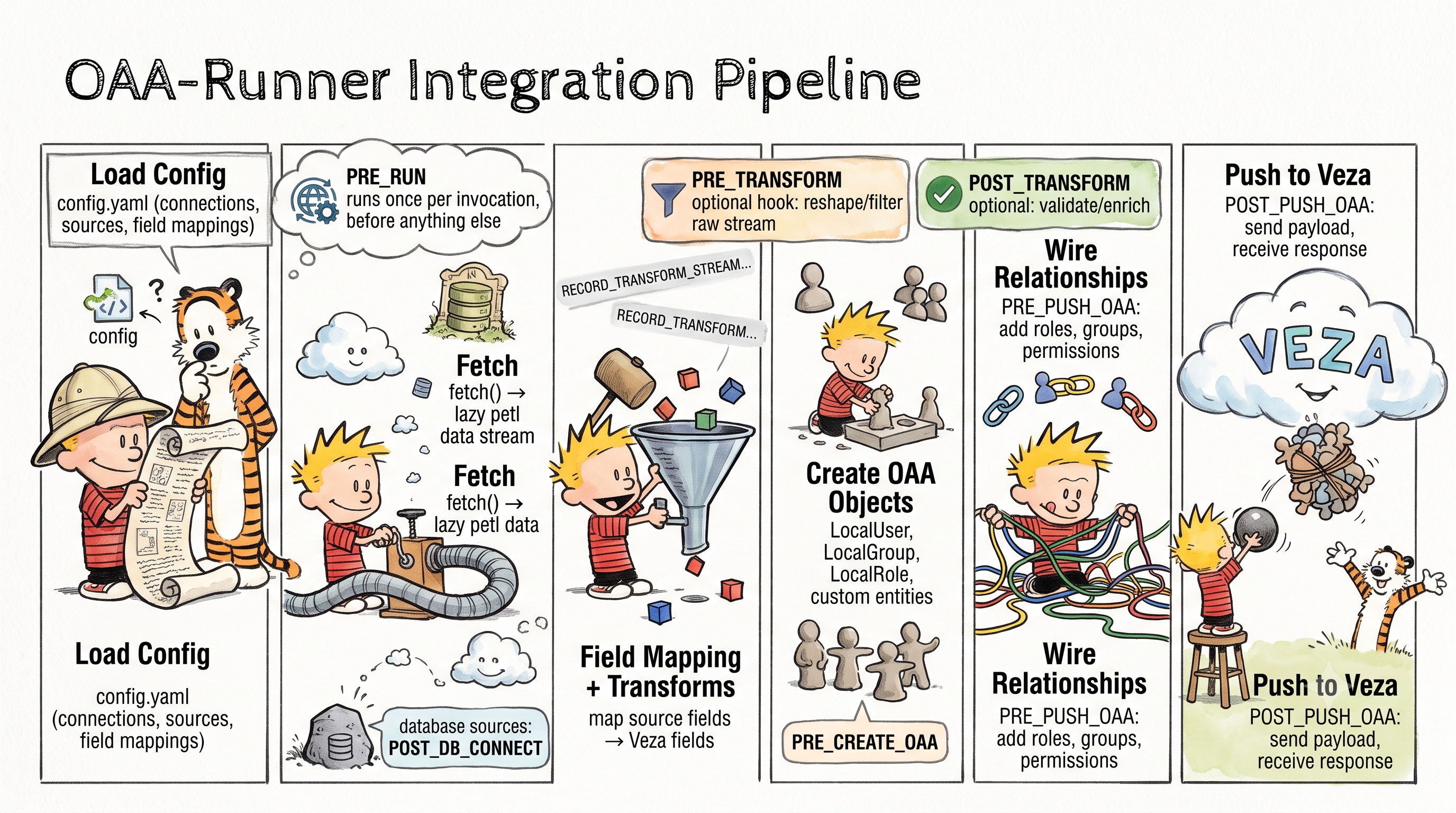
Phase 1 — Architect: discover & design
The goal of this phase is a design you’re confident in, not code. Time spent here is the cheapest time you’ll spend on the whole integration — every wrong assumption caught now is an assumption you don’t have to unwind later, in a hook, after data is already flowing.
Start with the source system, not the target schema. Read its API documentation for the entities that carry access — users, groups, roles, permissions, and whatever it calls the things those permissions apply to. Confirm authentication actually works with a raw curl or Postman call before writing a line of integration code; an auth problem discovered on day one costs an hour, the same problem discovered on day five costs a day of misdirected debugging elsewhere.
With the source entities in hand, map each one to an OAA template type — LocalUser, LocalGroup, LocalRole, a custom resource, or (for HR/org data specifically) the separate HRISProvider template. For every field on every entity, decide whether it lands on a built-in field (only a fixed set exists per entity type — check before assuming a field name like description is one of them) or becomes a custom property, and if the latter, whether its name needs slugifying to satisfy the property-naming constraint. Sketch the relationship model explicitly: which entities hold roles, which roles grant which permissions, and whether “role” in this source actually behaves like a group (a membership list) rather than a permission set — that distinction changes which OAA type it becomes.
Finally, decide up front where a config.yaml transform is enough and where a hook is genuinely required. Field renaming, date normalization, and static relationship shapes belong in configuration; hooks are for cross-record relationships, computed conditions, and external lookups that configuration can’t express. Making this call deliberately, before writing anything, avoids reaching for a hook out of habit for something a transform would have handled in three lines of YAML.
Milestones:
Auth against the source API confirmed outside any integration code
Entity-to-OAA-schema mapping table drafted (source field → OAA field or custom property)
Custom property names checked against the naming constraint
Relationship model sketched (who holds what access, through what path)
Hook-vs-config decision made explicitly for every field and relationship, not deferred to the build
See also: Config.yaml first, hooks second
Phase 2 — Build: scaffold & implement
With a design in hand, this phase is mostly mechanical: turn the mapping table into configuration and code. Start with config.yaml — connection, sources, and field mappings — since a config-first design means most of the entity and field work should already be expressible declaratively, before any Python is written.
Write the fetch logic next: pull records from the source API, paginate correctly, and return them as a lazy-evaluated table rather than loading everything into memory at once. Watch for one specific footgun here — if records have inconsistent shapes (a field present on some rows and absent on others), normalize every record to the same key set before it’s returned, or the missing field vanishes from the entire dataset silently rather than just the rows that lacked it.
Only write the hooks that the design phase flagged as necessary. If a hook turns out to be needed for something a transform should have handled, that’s worth pausing on — it usually means a config option was missed, not that the hook is wrong.
Add mock handlers so the integration can be developed and re-tested offline without hitting the live API on every iteration. Mock coverage has real limits worth knowing before relying on it too heavily: it can’t exercise retry/backoff behavior or header-dependent logic, and endpoints with parameterized paths need a concrete mock ID rather than a path template. None of that blocks using mocks for the bulk of iterative development — it just means retry logic and header-based pagination need a pass against the live API before the integration is considered done.
Close the phase with a README documenting setup, environment variables, usage, and known gotchas — future readers (including yourself in six months) will thank you for a predictable structure across integrations rather than a bespoke one each time.
Milestones:
config.yamlvalidates cleanlyFirst run against mock data produces a well-formed output with no unexpected empty fields
Expected relationships (user→role, role→permission, etc.) appear correctly in mock output
Required environment variables are documented, with a
.env.templatecovering all of them
See also: Building Your First Integration, How to Write a Fetch Function, How to Mock API Responses for Local Development, How to Bundle for OAA Runner
Phase 3 — Validate: prove it against reality
Mock data proves the code runs; it doesn’t prove the design is right. This phase is about running against the real system and checking every assumption from Phase 1 against records that weren’t handpicked to be well-behaved.
Run against the live API without pushing to Veza, and treat the first clean run as a starting point, not a finish line. Spot-check individual real records against the field-mapping assumptions made during design — date formats, boolean representations, and the difference between a field that’s genuinely absent versus one that’s present but empty are exactly the kind of thing that looks fine in a handful of test records and breaks on the full dataset. Pagination is a common source of surprises here too: confirm the real “no more pages” condition matches what the code checks for, since that logic often can’t be fully exercised against mock data.
Once the no-push run looks right, push to a test Veza tenant and check the result in the UI — this is the first point where relationships and entity counts are visible as an actual access graph rather than as a JSON diff. If the integration will be deployed as a packaged connector rather than run in place, build the bundle now and verify its contents match what was actually tested, not what was intended.
Milestones:
A
--no-pushrun against the live API completes with no errorsA sample of real records manually checked for correct field values, not just “field is present”
Relationship counts look sane relative to what the source system reports
A real push to a test Veza tenant confirmed visually in the UI
If deploying as a bundle: bundle built and its contents verified against what was tested
See also: How to Run Integrations Locally, How to Handle API Pagination, Integration Best Practices: Lessons from the Field